Make your own questions.
Review before you forget
Turn what you need to memorize into flip cards or multiple-choice questions and keep them in sets. Just mark whether you knew each one, and LQuiz keeps track of when to show it again.
Sign in with Google · No install, runs in your browser
Tap the card to flip it
Sound familiar?
You studied it. Why can't you remember it on the exam?
Study once, never again
Your textbooks and notes sit untouched until the night before the exam.
No idea what to review
You can't tell what you know from what you forgot, so you reread everything.
Making questions is a chore
Copying everything you need to memorize, one by one, wears you out fast.
Make questions quickly in LQuiz, and let LQuiz tell you when to look at them again.
How it works
Make, study, review
- 01
Make questions
Turn what you need to memorize into flip cards or multiple-choice questions and put them in a set.
- 02
Study
Go through a set and mark whether you knew each one. Only the ones you didn't know come back.
- 03
Review
Known questions come back at growing intervals: 1 day, 3 days, 7 days…
Question types
From flip cards to multiple choice
Besides flip cards, you can make multiple-choice questions. When you check your answer, you see the correct answer next to the one you picked.
- Flip card (front · back)
- Multiple choice (one answer)
- Multiple choice (several answers)
Review
LQuiz decides when you review
Just mark each card as known or not. Known cards come back at longer and longer intervals, from 1 day up to 4 years, and unknown cards come back tomorrow.
- See how many cards are due today
- See how many cards sit at each interval
- Pick which problem sets to review
Organize
Sets for subjects, folders for chapters
Group questions into sets and split each set into folders. You can study just the folder you need.
- Folders inside a set
- Reorder questions, move or copy them to another set
- Study one folder at a time
Making questions
Text, images, even note captures
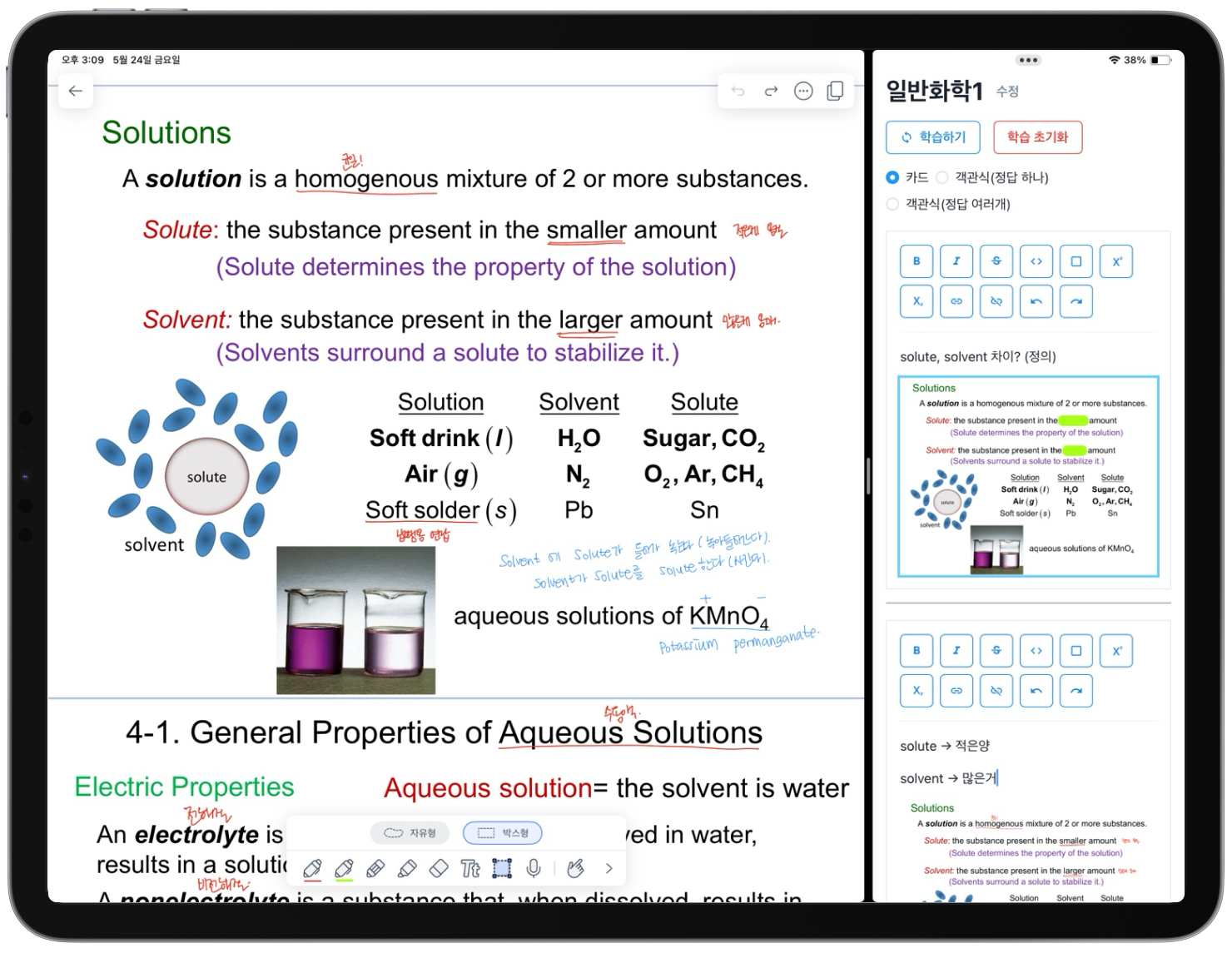
Write formatted text, and paste or drag in images. Paste a capture of your iPad notes and it becomes a card as is. Cover the parts to memorize before capturing, and you get a fill-in-the-blank card.
- Bold, superscript/subscript, boxes and more
- Add images by pasting or dragging, then resize them
- iPad note captures become cards as they are
Anywhere
On your computer, phone, or iPad
LQuiz is a web app, so it runs in your browser with nothing to install. Add it to your home screen and it opens like an app.
Computer
Make questions and organize sets on a big screen
Phone
Review in spare moments on the go
iPad
Make cards right next to your notes app
iPhone · iPad · In Safari, tap Share → Add to Home Screen
Android · In Chrome, open the menu → Add to Home screen
FAQ
Questions?
Turn what you studied today into questions
Create an account and make your first problem set right away.